August 25, 2026 · 6 min read
How to Give Claude or ChatGPT Context on a Private GitHub Repo
If your repo is public, this is a solved problem. Paste the URL into pretty much any repo-to-context tool and you're done in ten seconds. Private repos are a different story, and most guides quietly skip over that part — probably because the honest answer involves a bit more thinking than "paste a link."
The core issue is access. A public repo is just... public. Anyone, including a server you've never heard of, can read it without asking permission. A private repo requires you to prove you're allowed to see it, and that proof usually comes in the form of a GitHub personal access token — a string of characters that, in the wrong hands, can do a lot more than read one repo.
Why the token part makes people uneasy
A lot of "paste your repo, get your AI context" tools ask for a GitHub token when the repo is private. That's a reasonable thing for them to ask for — there's no other way to prove access — but it's also a reasonable thing to be cautious about. Depending on the scopes you grant it, a token can read every private repo you have access to, not just the one you meant to share. If that token is sent to a third-party server to fetch your files, you're trusting that server with more than you probably intended.
None of this means those tools are doing anything wrong. It just means the convenience comes with a trust decision, and it's worth knowing you're making one.
What actually works, without over-sharing
There are a few reasonable paths here, depending on how much friction you're willing to accept in exchange for how much you trust the tool:
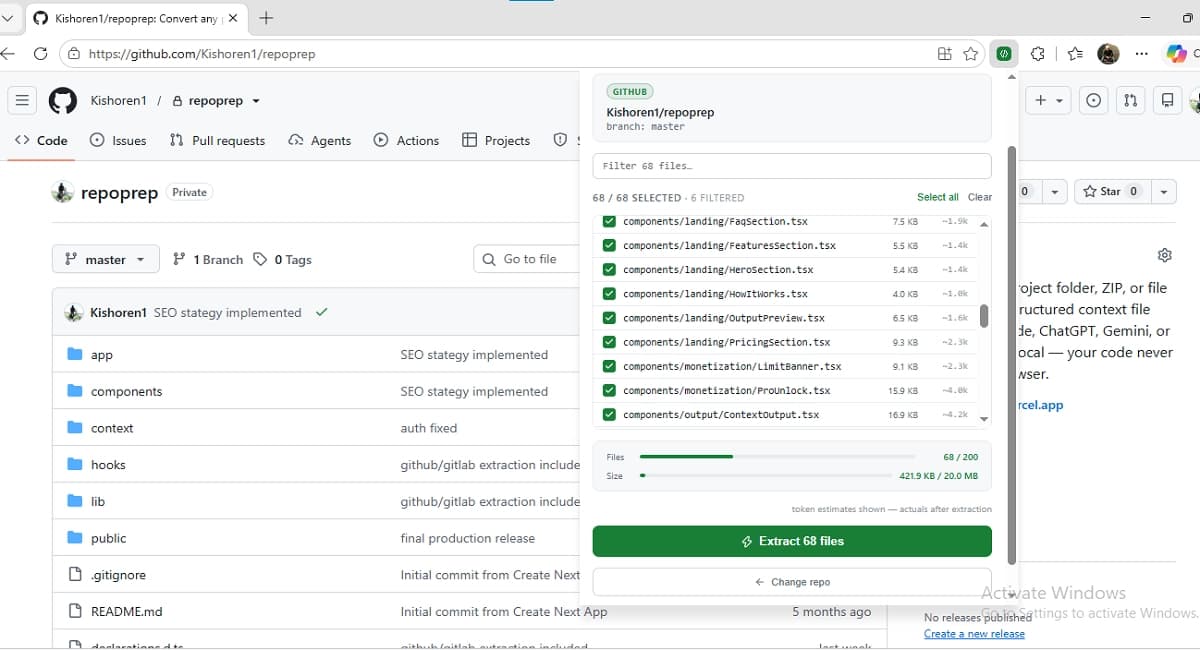
- Use a browser extension that runs on the repo page itself. This is the least awkward option for private repos, because your browser already has an authenticated session with GitHub — you're logged in, looking at the page. An extension that reads the DOM you're already viewing doesn't need a token at all; it's using the access you already have, in the browser you're already in.
- Clone locally, then use a local-folder tool. Slower, but it sidesteps the token question entirely — git handles auth on your machine the way it always has, and once the repo is on disk, any tool that reads local folders can take it from there.
- Scope a token tightly and use it once. If a tool genuinely needs a token, generate one scoped to read-only access for that single repo, use it, and revoke it afterward. It's more steps, but it limits the blast radius if something goes wrong later.
Why the browser-session approach is the practical default
Of the three, the browser extension route tends to be the one people actually stick with, mostly because it doesn't ask you to do anything extra. You're already on the repo page. You already have access. An extension that works from there just... uses that, the same way any other extension reads whatever page you're currently looking at.
The repoprep Chrome extension works this way — it runs on the GitHub or GitLab page you're already logged into, and everything it reads gets processed locally in your browser rather than sent anywhere. No token to generate, no scope to think about, nothing to revoke afterward. For public repos, the same job can be done from the web-based GitHub workflow, which fetches directly from the public API without needing a browser session at all.
One thing worth avoiding regardless of which route you pick
Whatever method you use, it's worth double-checking what actually gets included before you paste anything into an AI chat. Private repos are more likely than public ones to contain things you'd rather not share at all — internal API keys, staging credentials, .env files that never should have been committed in the first place. Access control on the repo doesn't automatically mean those files get filtered out of whatever context you generate — that's a separate check, and it's worth doing every time, not just the first time.
The short version
Public repos: paste a link, move on. Private repos: think for a second about where your access token would go, and prefer a workflow that doesn't need one if you can. A browser extension using your existing session is usually the least friction and the least trust you have to extend to a third party — which, all else equal, is a good trade to take.
Related reading
Working with a public repo instead?
No token needed either way — paste the URL and repoprep pulls the file tree straight from the public API.
GitHub / GitLab workflow →