Prepare a codebase for AI
without touching a terminal
Drop in a project folder or ZIP archive, pick the files that matter, and get a clean AI-ready context file — no repo, no install, no upload.
Not every project lives on GitHub
Plenty of real work happens in folders that never get pushed anywhere — a client project, a prototype, an internal tool, a downloaded ZIP from a teammate. None of that has a repo URL to paste into an AI-context tool.
repoprep reads straight from your device: point it at a folder or ZIP, and it filters out the noise, blocks anything that looks like a secret, and hands back one clean file — all without the project ever leaving your browser.
How the local-project workflow works
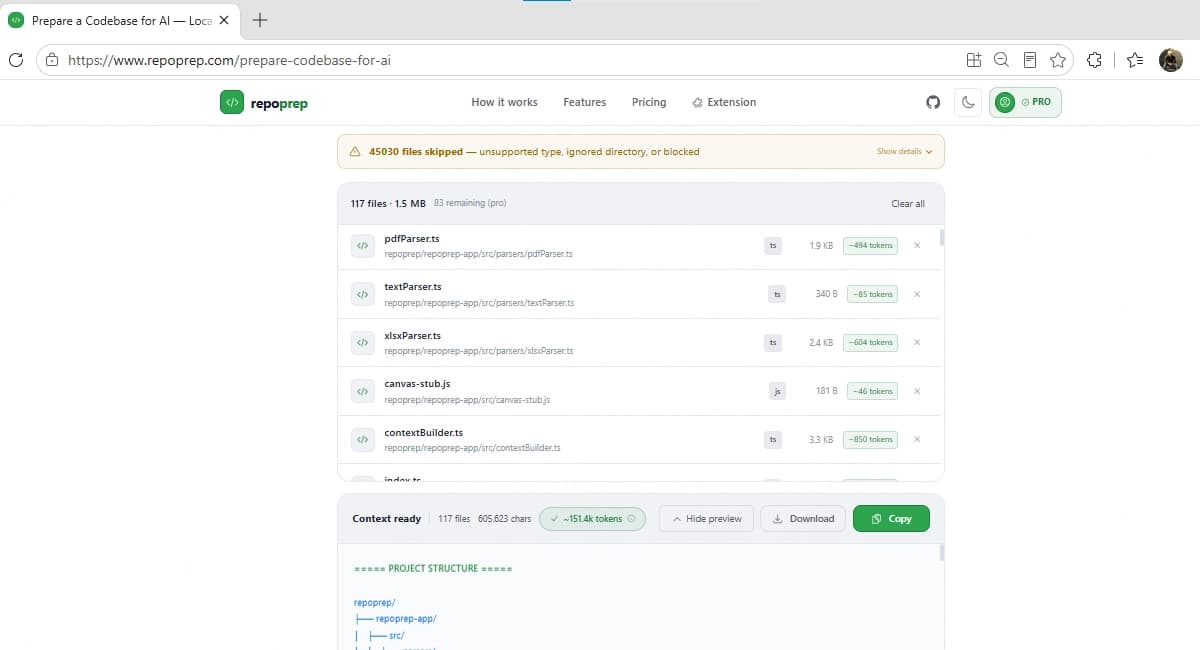
Know before you paste
Larger local projects can blow past a model's context window without warning. Pro adds a token estimator so you can see roughly how large your context is and which models it fits, before you find out the hard way. The parsing engine behind all of this is open source, if you want to see exactly how filtering decisions are made.
Common questions
Does this work with a folder that isn't on GitHub?
Yes — that's exactly what this page is for. Drop in any local project folder or a ZIP archive, whether or not it's version-controlled or pushed anywhere.
How are sensitive files like .env handled?
Files that commonly hold secrets — .env, private keys, credential files — are detected and blocked automatically before they're ever added to your context, not just filtered by extension.
What's the difference between this and the GitHub/GitLab workflow?
This workflow reads files directly from your device — no repository or URL required. Use the GitHub/GitLab workflow instead when your code is already hosted and you'd rather paste a link than select a local folder.
Can I see the token count before pasting into an AI tool?
Pro unlocks a token estimator so you can check your context size against common model limits before you paste, instead of finding out it's too large after the fact.
What if my project has a lot of noise — node_modules, build folders, etc.?
Those are filtered out automatically as soon as you drop the folder in. You only ever see and select from the files that are actually source material.
Working from a hosted repo instead of a local folder?
See the GitHub/GitLab workflow →